How to stitch screenshots into one long screenshot
- Take overlapping screenshotsScroll a little less than a full screen each time so every screenshot repeats a few rows of the last. Aim for at least 10 percent overlap.
- Select them in PhotosSelect the screenshots in Photos, or open FullPage and tap Photos.
- Share to FullPageTap Share and choose FullPage. The order is detected for you, even if you picked the newest first.
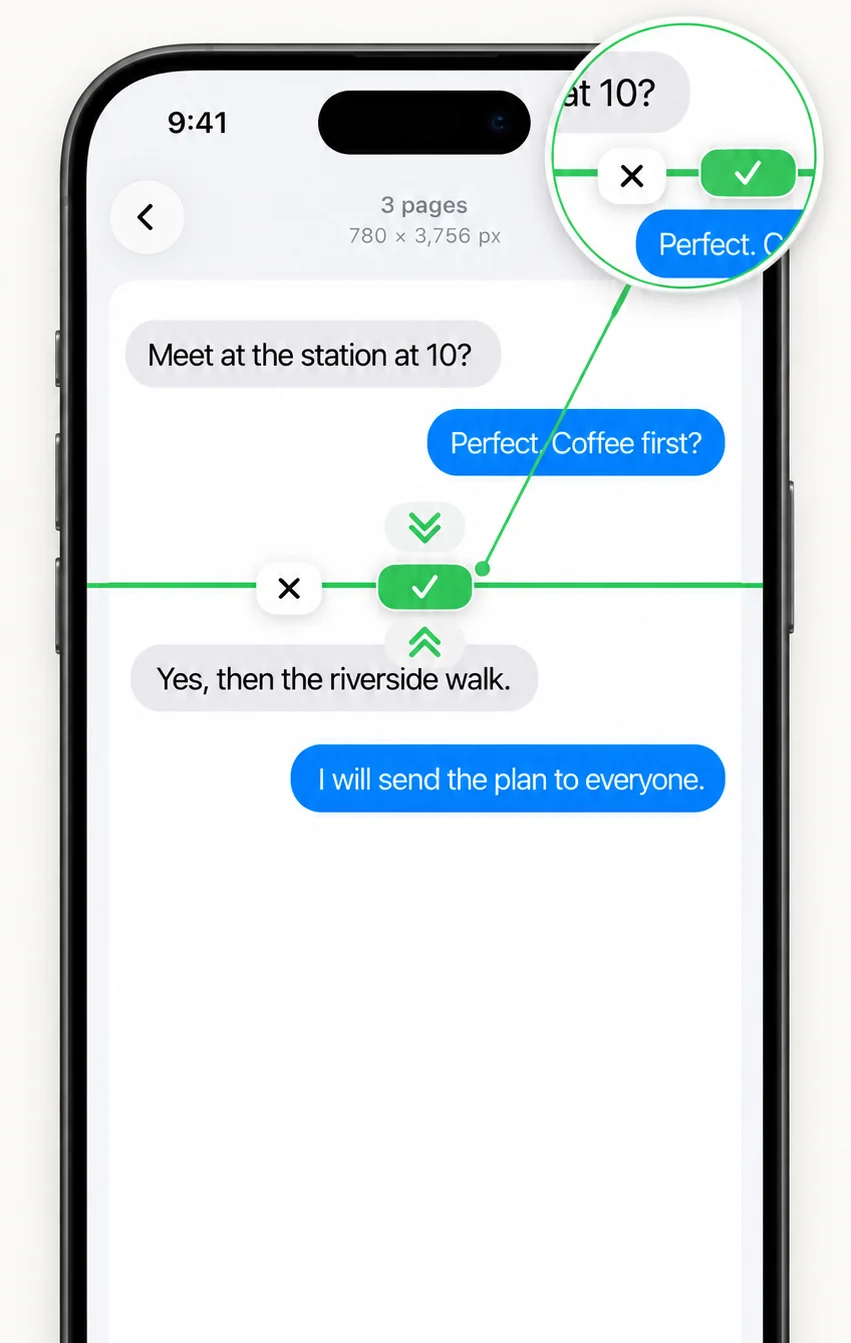
- Check the joinsTap any join to nudge it or cut it. Auto Trim switches between whole screenshots and a trimmed cut instantly.
- SaveExport as PNG, JPG or PDF.
Stitch, merge, combine or join: what is the difference?
Nothing. People search for all four. They all mean putting several screenshots together into one image. FullPage goes a step further than placing them end to end: it removes the overlap, so the result reads like one continuous screenshot.
How does automatic screenshot stitching work?
FullPage turns every screenshot into a fingerprint of its rows, then looks for the scroll shift where the most content rows match exactly. Bars that never change at the top and bottom, like the status bar and navigation bar, are kept once. Flat rows, such as empty chat space, are ignored so they cannot fake a match.
Each seam is cut in the middle of the overlap, so nothing repeats and nothing is missing.
Tips for a seamless stitch
Overlap is what makes a stitch seamless.
- Overlap each screenshot by at least 10 percent.
- Scroll steadily and take the screenshots in one pass.
- If two screenshots do not overlap, FullPage joins them edge to edge and tells you.
- Duplicate screenshots are skipped automatically.
Screenshots or photos?
FullPage is made for screenshots that overlap. To place separate pictures one after another, see stitching photos into one long image.
Frequently asked questions
How do I combine screenshots into one image on iPhone?
Select overlapping screenshots in Photos, tap Share and choose FullPage. It merges them into one seamless image.
How much should screenshots overlap?
At least 10 percent of the screen. In practice, scroll about three quarters of a screen between screenshots.
Does the order of the screenshots matter?
No. FullPage detects when the newest screenshot was picked first and orders them for you.
How many screenshots can I stitch for free?
Up to 10 per stitch, with no watermark. Pro removes the limit with a one-time US$3.99 purchase.
Can I fix a join that looks wrong?
Yes. Tap the join to move it or cut it, and the result updates instantly.
Last updated .